
How to setup TeamApp to get notifications for your childs team
NOTE short video here on how to do setup Access Groups - this allows you to get notifications and chat with the team:
Hello Ballan Brumbies members! We've set up all the teams for the Summer 2024-25 season. You can find them on PlayHQ for registration and on TeamAPP for info and communication.
•
While we’re hoping these will be the final teams, please be aware that there might still be changes for a number of reasons. If you believe your child has been placed in the wrong team, please email coachingcommittee@ballanbrumbies.com.au
•
Some teams don’t have coaches and training times, these will be updated as soon as we have the information
•
Each team has a unique registration link listed in the TeamAPP. Simply find your child's team and click on the link. Here are the steps you need to follow:
Make sure you have registered and are using TeamAPP.
Ensure you have been assigned to the Access Groups your child belongs to.
Click on the Cog

Go in to Access Groups and add yourself to your child’s team/s
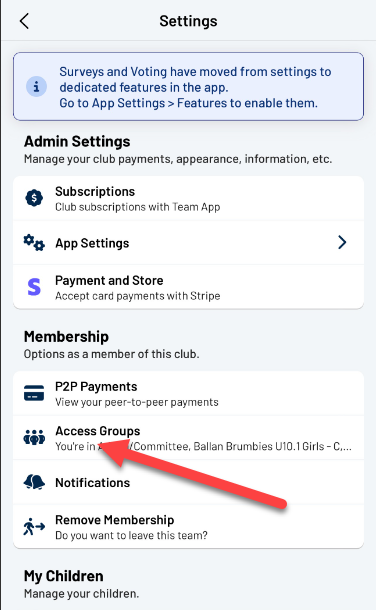
You can see the access groups that you are part of at the top of the list if your childs team is not there please find in the lower section and click on it to add your self

THIS MAY NOT BE REQUIRED: Turn on notifications for that team. Go to Teams and your child’s team

Then click on enable notifications


NOTE: you may also want to favourite your childs team so they are at the top of your teams list.
Lastly, you need to complete the registration process. Click on the link associated with your child's team. Each link is unique to the team, so please avoid registering two children using the same link unless they are part of the same team. If you need a discount code for special situations or additional games, please email finance@ballanbrumbies.com.au

When you click on the link make sure that you a registering for the right team

When you get the option to register another player DO NOT unless they are in the same team.